Insights
Internal Tools & Apps: When to Build, When to Buy, and When to Walk Away

Most SMEs and startups don’t suffer from a lack of tools and software; they struggle because the tools and software they have weren’t built for how they actually operate as a business.
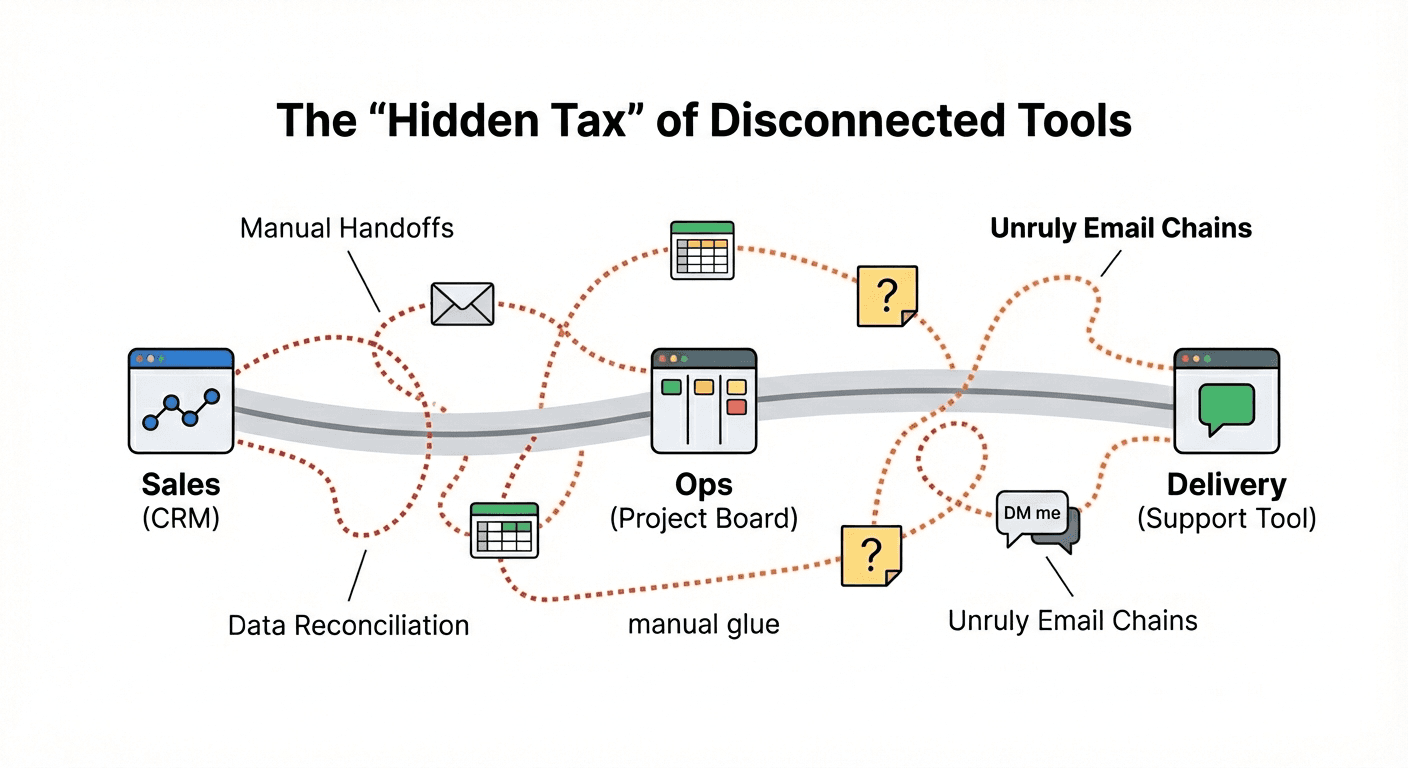
It usually starts with a simple stack: a CRM for deals, a form for leads, a digital board for projects, etc. But as you grow, the "just for now" systems multiply and the workarounds start to appear. Data starts living in two places, and spreadsheets are hastily spun up in a bid to reconcile the differences.
These small inconsistencies get tolerated at first because things are moving along and the business is growing. But over time, these small workarounds turn into Operational Drag: a hidden tax on your growth. You find yourself hiring "human glue", the extra heads needed to handle manual admin, chase updates, and reconcile versions; work that doesn’t actually move the business forward. Eventually, errors creep in and the team spends more energy managing the system than doing the work the system was meant to support.
That’s the gap internal tools and apps are meant to close, not by introducing more software, but by shaping software around the way your work actually runs.
Tool choice isn’t the hard part. Fit is.
When operational pressure builds, the default reaction is often: we need a better tool. But in most growing businesses, the issue isn’t the quality of the tools, it’s the fit between those tools and the reality of your business’ real workflow.
Off-the-shelf SaaS (software-as-a-service) tools, and conventional products might give you 80% of what you need to complete a particular workflow, in exchange for a flat monthly or annual fee. But that remaining 20% is where the real cost lives. It’s the handovers that don’t quite fit, the approvals that need nuance, the edge cases that happen more often than anyone admits, and the “small” exceptions that end up shaping the whole process. You’re left with a workflow that functions on paper, but never feels fully under control, quietly draining resources as your team works around the tool rather than with it.
What “custom internal tools and apps” actually are
A custom internal tool is software designed around your workflow, built to support how your team actually works, not how a generic product assumes you should or would work. It isn’t a public-facing app. It isn’t a sprawling platform rebuild. And it’s not “digital transformation”. In practice, it’s often something very specific, such as:
an internal dashboard that shows the numbers people actually need, without the spreadsheet gymnastics
a lightweight admin system to replace a fragile mix of tools and manual tracking
a request + approval flow so work stops living in inboxes and Slack threads
a client portal that reduces follow-ups and keeps information in one place
an internal reporting tool that automatically pulls data from where it already lives, finally giving you a 'source of truth' that you don’t have to second-guess
Why off-the-shelf tools usually break down
Off-the-shelf tools rarely fail all at once. They fail gradually.
They work well enough at first. Then your business grows. Your workflow evolves. Edge cases multiply. And the tool starts requiring more and more “human glue” to keep it functioning. This happens for a few predictable reasons:
1) They’re built for averages.
Most tools are designed to serve broad markets. They have to generalise. The further your business sits from the centre of that general purpose, the more friction you absorb.
2) They increase process latency (waiting time between steps)
Generic tools unintentionally create additional steps and delays between those steps:
someone has to log in to update something
another person has to notice it
a third person may have to interpret the action
The system works, but it adds delays, because it doesn’t work to your specific workflows, processes and controls.
3) They collapse under cross-functional reality
Most tools might feel fine inside one function (sales, ops, delivery). But the pain appears when work crosses boundaries:
sales → delivery → support
operations → finance → leadership
product → customer success → billing
Generic tools rarely model the handoffs cleanly. So teams either:
duplicate data across tools, or
hold the “real” handoff in email/Slack and use the tool as an afterthought
This is why a tech stack that looks “modern” still feels manual.
At some point, you realise you’re not paying for software to remove effort, you’re paying for software that requires management.
When is it worth building something custom?
A good internal tool doesn’t start with “let’s build an app”. It starts with a clearer question: Is this workflow stable, repeated, and costly enough to deserve a system? Here are the signals:
Good signals (usually worth building)
The same manual steps happen every day or every week
People are constantly reconciling information between systems
A workflow relies on specific individuals to keep it moving
Errors and inconsistencies are creating real downstream cost
You can describe the workflow clearly, even if it’s imperfect
There is someone who can own the system once it exists
A simple rule: if human attention is being spent making something predictable, it’s a candidate for an internal tool.
Bad signals (usually too early)
The workflow is still undefined (“we’re figuring it out”)
You’re hoping software will force alignment that leadership hasn’t agreed on
Nobody can own the system after it’s built
The scope expands every time you talk about it
The goal is impressing stakeholders, rather than reducing operational drag
This is where internal tools become expensive mistakes: built on moving sand, trying to solve organisational ambiguity with software.
Overall, good internal software is:
reliable: it reduces checking
fast: it doesn’t ask people to work around it
clear: it makes ownership and status obvious
purpose-built: it does one job, or set of interrelated jobs well
integrated where it counts: so data doesn’t need re-entering
easy to extend: because the business will change
Most importantly, it removes the need for constant reconciliation. If your team still has to ask questions like “is this up to date?”, then the system hasn’t actually earned trust.
If you’re considering an internal tool, start here
Before building anything, ask:
What workflow are we trying to make reliable?
Where does work currently get stuck, duplicated, or forgotten?
What information do people keep re-checking because they don’t trust the tools?
What should the system handle automatically, so humans don’t have to?
What’s the smallest useful version we could ship and learn from?
If you can answer those questions clearly, you’re already most of the way there. If you can’t, that’s actually the most valuable discovery you can make before spending a penny on a build. Because the real value of internal tools isn’t just ‘having custom software’: it’s removing the operational drag your business pays for quietly, every single day.